微信小程序 -- ios 底部小黑条样式问题

问题:
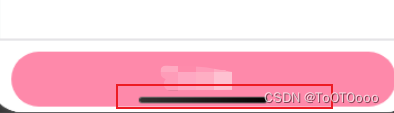
如图,ios有的机型底部伪home键会显示在按钮之上,导致点击按钮的时候误触
解决:
App.vue
<script>export default {wx.getSystemInfo({success: res => {let bottomHeight = res.screenHeight - res.safeArea.bottom;uni.setStorageSync('bottomHeight', bottomHeight)console.log('小黑条高度', bottomHeight);},fail(err) {console.log(err);}})},}
</script><style>/*每个页面公共css */@import url("static/css/base.css");
</style>
- 有样式问题需要修改的页面
我这里写的是:如果不是有小黑条的机型(也就是bottomHeight===0的机型),那么我的paddingBottom设为10px;如果有的话,那么paddingBottom就设为小黑条的高度bottomHeight
<template><view @click="submit" :style="{paddingBottom:(bottomHeight===0?'10px':bottomHeight+'px')}"><view>提交</view></view>
</template><script>export default {data() {return {bottomHeight:0, // 底部小黑条高度}},onLoad() {this.bottomHeight = uni.getStorageSync('bottomHeight')||0;console.log('底部小黑条高度',this.bottomHeight)},}
</script><style scoped lang="scss">
</style>
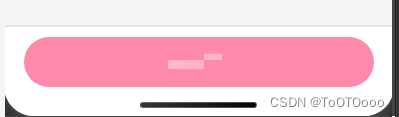
效果图
参考
vue动态添加style样式
【对象】
html :style="{ color: activeColor, fontSize: fontSize + 'px' }"
html :style="{color:(index==0?conFontColor:'#000')}"
【数组】
html :style="[baseStyles, overridingStyles]"
html :style="[{color:(index==0?conFontColor:'#000')},{fontSize:'20px'}]"
【三目运算符】
html :style="{color:(index==0?conFontColor:'#000')}"
html :style="[{color:(index==0?conFontColor:'#000')},{fontSize:'20px'}]"
【多重值】
此时,浏览器会根据运行支持情况进行选择
html :style="{ display: ['-webkit-box', '-ms-flexbox', 'flex'] }"
【绑定data对象】
- html :style=“styleObject”
data() {return{styleObject: {color: 'red',fontSize: '13px'}  }
}
————————————————
原文:https://juejin.cn/post/6844903921509466120
小黑条适配
在移动端开发过程中,经常遇到iphone11、iphoneX底部小黑条遮挡页面底部,纯css实现设备的适配。详见我的上篇文章。
在开发微信小程序中,也会遇到iPhone全面屏手机,底部小黑条会遮挡页面底部,尽管微信小程序已经实现部分页面的适配,但个别页面仍旧需要做适配处理。
解决方案:使用wx.getSystemInfoSync()中的screenHeight和safeArea对象的bottom属性判断
-
screenHeight是获取屏幕的高度,因为bottom是以屏幕左上角为原点开始计算的,所以需要的是屏幕高度。 -
safeArea对象的bottom属性是安全区域右下角纵坐标。 -
screenHeight减去safeArea对象的bottom属性,则是底部小黑条的高度。
获取底部小黑条的高度,全局存储使用。
在全局app.js里,需要全局存储一个数据
globalData: {bottomHeight:0
}
2.在全局app.js的onLaunch函数:
wx.getSystemInfo({success: res => {this.globalData.bottomHeight = res.screenHeight - res.safeArea.bottom;},fail(err) {console.log(err);}
})
3.在所需页面的js文件从全局变量中获取
onLoad: function (options) {this.setData({bottomHeight : app.globalData.bottomHeight })}
4.在所需页面的wxml里面使用:
<view class="page" style="padding-bottom:{{bottomHeight }}px">
————————————————
原文链接:https://blog.csdn.net/u014213847/article/details/129159964
未整理参考