Nginx负载均衡实战

🎵负载均衡组件
ngx_http_upstream_module
https://nginx.org/en/docs/http/ngx_http_upstream_module.html
upstream模块允许Nginx定义一组或多组节点服务器组,使用时可以通过多种方式去定义服务器组
样例:
upstream backend {server backend1.example.com       weight=5;server backend2.example.com:8080;server unix:/tmp/backend3;server backup1.example.com:8080   backup;server backup2.example.com:8080   backup;
}server {location / {proxy_pass http://backend;}
}
ngx_http_proxy_module
https://nginx.org/en/docs/http/ngx_http_proxy_module.html
样例:
该ngx_http_proxy_module模块允许将请求传递到另一台服务器。
location / {proxy_pass       http://localhost:8000;proxy_set_header Host      $host;proxy_set_header X-Real-IP $remote_addr;
}
🎶Nginx负载均衡配置实例
| 主机名 | IP | 角色 |
|---|---|---|
| NGINX-1 | 54.169.87.5 | NGINX服务器 |
| NGINX-2 | 18.143.107.110 | NGINX服务器 |
| NGINX-3 | 122.51.114.14 | NGINX负载均衡服务器 |

- 在两台NGINX服务器上操作,创建测试文件数据
echo "`hostname -I` " > /usr/share/nginx/html/index.html
- 配置NGINX负载均衡服务器,定义Web服务器池
upstream backend {server 18.143.107.110:80 weight=1;server 54.169.87.5:80 weight=1;}
location / {proxy_pass       http://backend;
}
完整配置 nginx.conf
worker_processes  1;
events {worker_connections  1024;
}
http {include       mime.types;default_type  application/octet-stream;sendfile        on;keepalive_timeout  65;upstream backend {         #这里定义Web服务器池server 18.143.107.110:80 weight=1;  server  54.169.87.5:80 weight=1;}server {            #这里定义代理的负载均衡域名虚拟主机listen       80;server_name  www.nginxtestlb.com;location / {proxy_pass http://backend;     #访问www.nginxtestlb.com,请求发送给backend里面的节点}}
}
本地主机配置域名解析
C:\Windows\System32\drivers\etc\hosts
122.51.114.14 www.nginxtestlb.com
- 浏览器访问

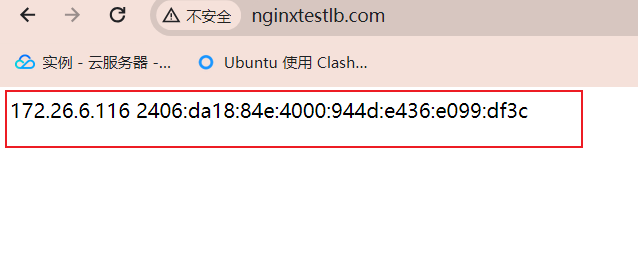
两次访问得出的信息不同,说明访问的Nginx服务器已经实现负载均衡和反向代理