MSSQL 程序集使用方法

1.C# 写一个程序
1.1新建一个项目【类库【.Net FrameWork】

1.2编写代码
删除
namespace ApiSQLClass
{
}
代码如下:【具体调用API模式根据具体编写】
using System;
using System.Collections.Generic;
using System.Linq;
using System.Text;
using System.Threading.Tasks;
using Microsoft.SqlServer.Server;public class ApiSQLHelper{ [SqlFunction]public static string CallAPI(string apiMethod, string apiURL, string apiPMS){return apiPMS;}}
2.数据库设定
2.1数据库设定
Use master
exec sp_configure 'show advanced options', '1';
goreconfigure;
goexec sp_configure 'clr enabled', '1'
goreconfigure;
exec sp_configure 'show advanced options', '1';
go
Use [DB] --DB 具体为需要使用的数据库ALTER DATABASE [DB]  SET TRUSTWORTHY on;
go
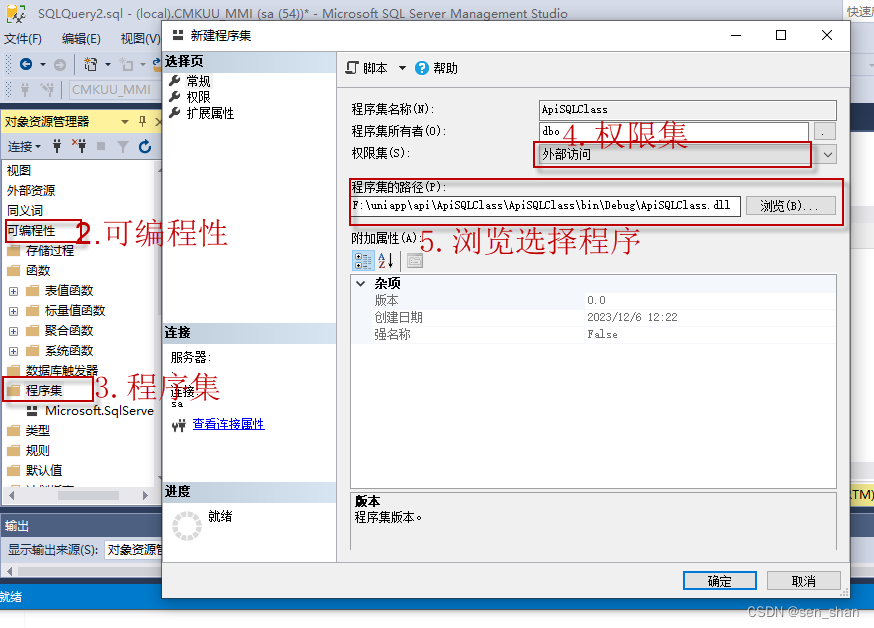
2.2程序集设定
1.选择需要设定数据库后按下步骤进行
3.SQL使用
3.1函数代码
create function [dbo].[fn_CallAPI]
(@apiMethod nvarchar(max)		--Post/Get, @apiURL nvarchar(max)		--API地址		, @apiPMS nvarchar(max)		--JSON格式的参数
)
RETURNS [nvarchar](max) WITH EXECUTE AS CALLER
AS
EXTERNAL NAME [ApiSQLClass].[ApiSQLHelper].[CallAPI]
3.2测试效果
declare @apiPMS nvarchar(max);
--set @pms='{"Username":"Test","Password":"Test"}'   --参数
set @apiPMS = (select 'admin' as 'User_id', '123' as 'PSW' for json path, without_array_wrapper);
select [dbo].[fn_CallAPI]( 'POST', 'apits',  @apiPMS)
结果集:{"User_id":"admin","PSW":"123"}
4.总结
4.1:需要删除:namespace,否则在创建函数时候报错
4.2:新建;类库【.Net FrameWork】,使用其他类型都未成功
4.3:.Net语句修改重新生成编译,需要把SQL 程序集删除重新设定才是修改后效果。