理解MyBatis原理、思想

JDBC编码的缺点
- 结果集解析复杂,列名硬编码,sql变化导致解析代码变化,系统不易维护。
- Sql语句硬编码,难以维护。 数据库配置硬编码。
- 频繁连接、释放数据库资源,降低系统性能。
- preparedStatement向占位符号传参数存在硬编码,不易维护。
MyBatis的核心原理、思想
MyBatis的出现,使得我们不用在代码中进行SQL语句硬编码,代码更加容易维护,更好的管理数据库资源,提升性能。
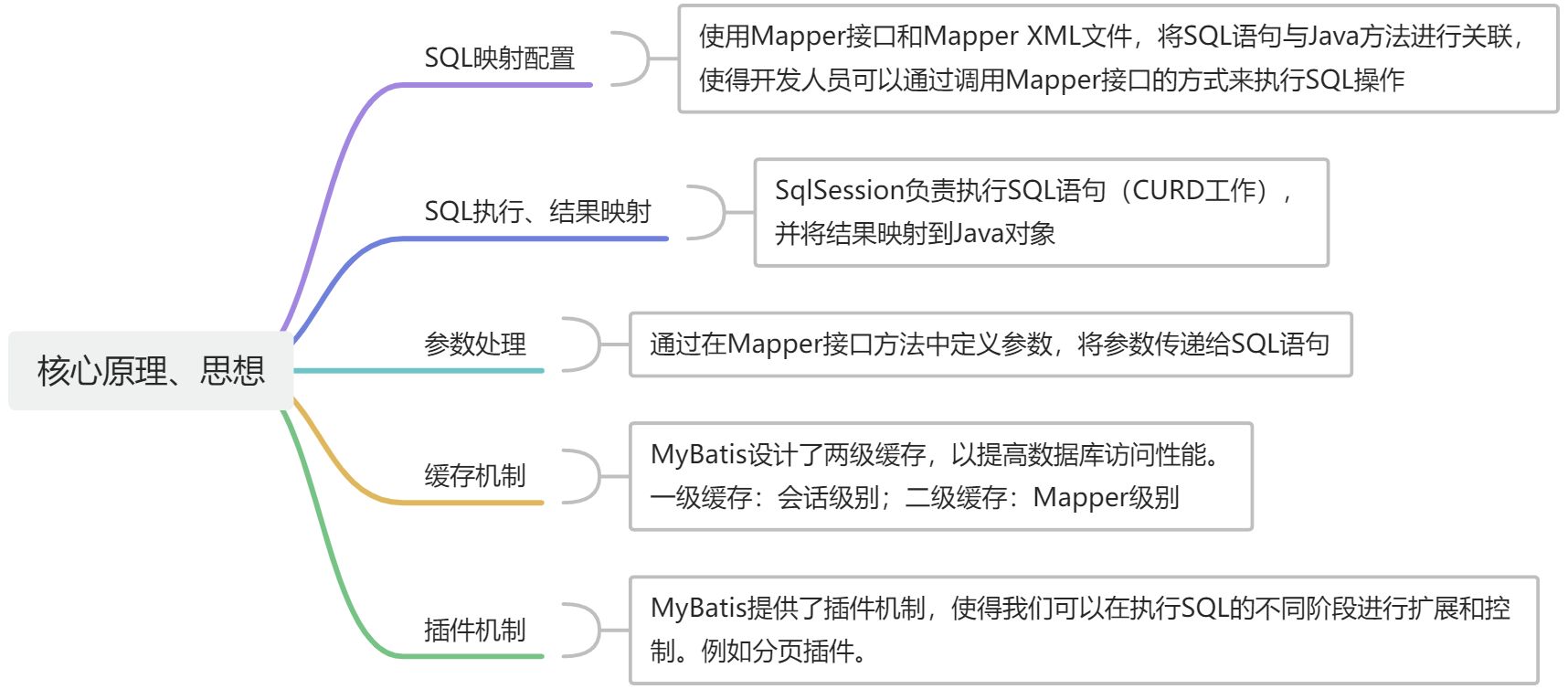
手写一个简单的ORM框架,加深理解
用例分析
框架写出来是给开发人员用的,使用过程无非 导包、配置、按规则编写代码、运行。
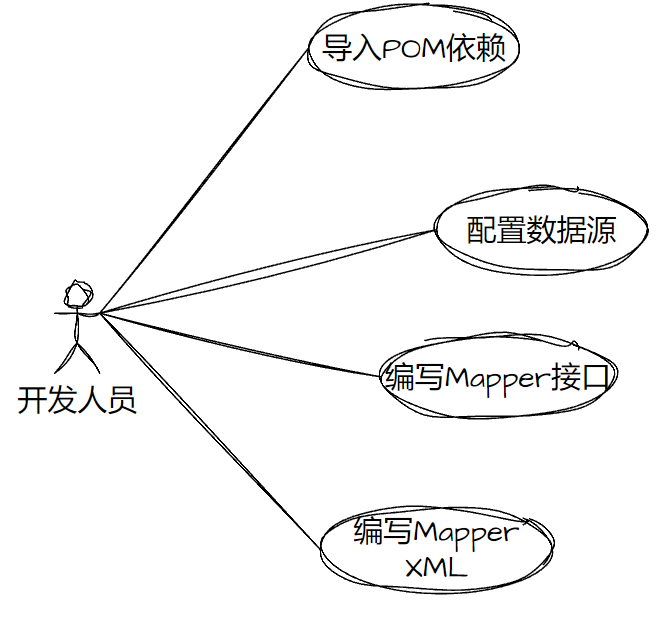
功能分析
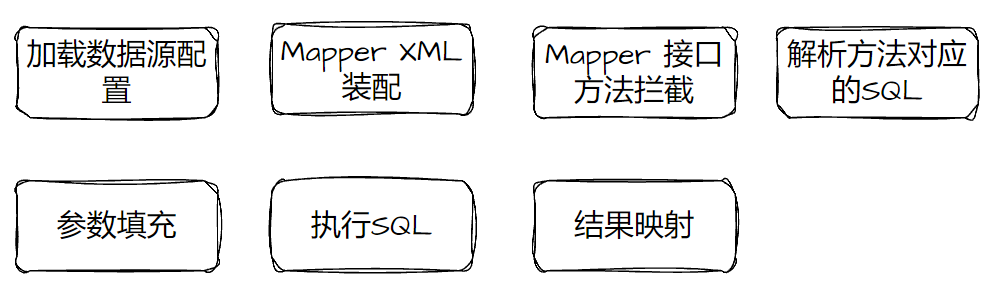
设计一个最小可用的仿MyBatis的ORM框架,那首先我们需要拿到数据源的配置信息、Mapper配置的信息,然后在调用Mapper方法的时候,解析方法参数,填充到Mapper方法对应的SQL中去,然后执行QL,拿到结果之后,按照配置解析并映射到对应的Java对象。
功能大概:
代码分析、设计
1.格式约定
首先,我们要约定数据源、Mapper配置信息的格式。
- 存储数据源信息、Mapper 配置信息的格式
<?xml version="1.0" encoding="UTF-8" ?>
<configuration><!-- 数据源信息 --><dataSource><property name="driver" value="com.mysql.jdbc.Driver"/><property name="url" value="jdbc:mysql://127.0.0.1:3306/ruoyi?characterEncoding=utf8"/><property name="username" value="root"/><property name="password" value="123456"/></dataSource><!-- Mapper XML文件配置信息 --><mappers><mapper resource="SysRoleMapper.xml"/></mappers>
</configuration>- 具体的Mapper XML文件的格式
<?xml version="1.0" encoding="UTF-8" ?>
<mapper namespace="com.hero.dao.SysRoleMapper"><!-- id:方法名称; resultType: 查询结果返回值--><select id="findAll" resultType="com.hero.dao.SysRole">select * from sys_role;</select>
</mapper>
2.数据对象
然后,我们需要一个存储数据源信息、Mapper信息、SQL信息的载体,简单来说 XML -> Java对象。
- Configuration类存储了数据源信息、Mapper XML解析之后的具体方法信息。其中,
sqlSourceMap对象的key存储Mapper XML中方法的全路径,比如:com.hero.dao.SysRoleMapper.findAll,而value存储SqlSource对象,此对象有 具体sql 以及 查询的结果类型。
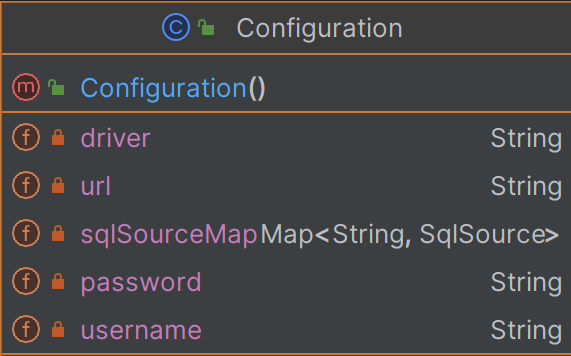
- SqlSource类存储了Mapper XML 中方法对应对应的sql,以及方法结果类型。
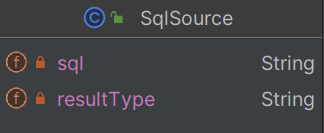
从json格式的角度来看Configuration对象的数据的格式,这样更好理解一些:
{"driver": "xxx","url": "xxx","sqlSourceMap": {"com.hero.dao.SysRoleMapper.findAll": {"sql": "select * from sys_role","reultType": ""}},"password": "xxx","username": "xxxx"
}
3.数据源加载、装配Mapper、解析SQL
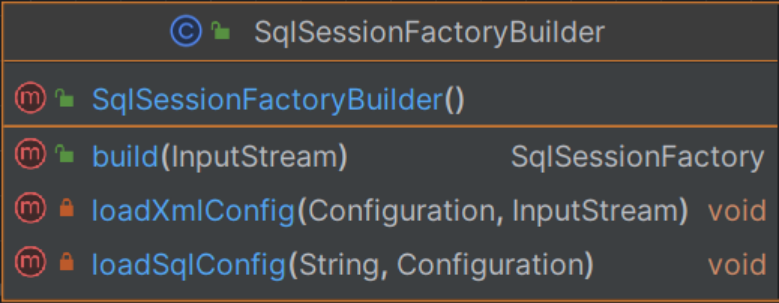
有了载体之后,我们要实现 加载数据源配置 、 **装配Mapper XML功能、解析方法对应的SQL **,在这里,由SqlSessionFactoryBuilder类负载从xml文件中加载数据源信息 并 装配Mapper信息,统一写入Configuration对象。
4.通用SQL方法接口与执行器
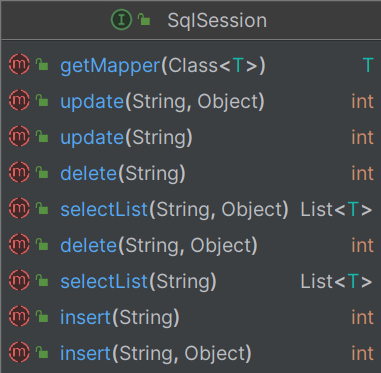
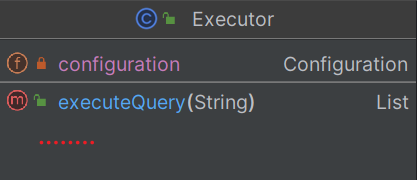
有了上述信息,我们就可以创建执行SQL语句的规范接口SqlSession,此接口提供了通用的方法去处理业务的CRUD语句,默认实现类是DefaultSqlSessionImpl,接口方法传入 Mapper XML方法 全路径,实现类将全路径传递给Executor类,Executor会获取到具体的SQL,进行参数填充,并发送SQL到数据库,然后拿到执行结果,进行结果映射,最后返回给实现类。
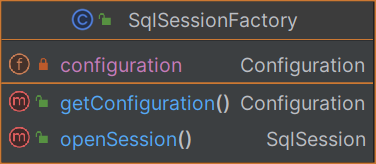
在这里,我们不直接创建SqlSession实现类,而是通过SqlSessionFactory工厂类创建。
- SqlSession接口。除了通用CURD方法(select\update\delete\insert),getMapper 也是一个重要的方法,可以获取Mapper接口的代理实例,通过Mapper接口即可执行SQL,不用直接使用SqlSession接口,例如
List<SysRole> list = sysRoleMapper.findAll()
- Executor类负责发送SQL到数据库,处理SQL的参数填充(绑定)、结果集的映射。
- SqlSessionFactory通过
openeSession()方法创建SqlSession对象
小结
通过SqlSessionFactoryBuilder类,我们将XML信息写入到Configuration对象,并构建一个SqlSessionFactory会话工厂,通过工厂类可以获取SqlSession接口具体实现类实例DefaultSqlSessionImpl,SqlSession接口提供了通用的CURD方法,而实现类依赖Executor执行器,实现参数填充、SQL发送、结果映射功能。

同时,我们提到了SqlSession的getMapper方法,在后面代码中会看到。
代码实现
Configuration
public class Configuration {private String driver;private String url;private String username;private String password;private Map<String, SqlSource> sqlSourceMap = new HashMap<>();// getting/setting
}
SqlSource
public class SqlSource {//存储了Sql语句private String sql;//存储封装JavaBean对象类的全限定名称private String resultType;// getting/setting
}
SqlSessionFactoryBuilder
public class SqlSessionFactoryBuilder {/*** 构建工厂对象* 参数:SqlMapConfig.xml配置文件的输入流对象*/public SqlSessionFactory build(InputStream inputStream) throwsDocumentException {Configuration configuration = new Configuration();//解析配置文件loadXmlConfig(configuration, inputStream);return new SqlSessionFactory(configuration);}/*** 解析框架使用者传入的配置文件*/private void loadXmlConfig(Configuration configuration, InputStreaminputStream) throws DocumentException {//创建解析XML文件对象SAXReaderSAXReader saxReader = new SAXReader();//读取SqlMapConfig.xml配置文件流资源,获取文档对象Document document = saxReader.read(inputStream);//获取SqlMapConfig.xml 配置文件内所有property标签元素List<Element> selectNodes = document.selectNodes("//property");//循环解析property标签内容,抽取配置信息for (Element element : selectNodes) {String name = element.attributeValue("name");if ("driver".equals(name)) {//数据库驱动configuration.setDriver(element.attributeValue("value"));} else if ("url".equals(name)) {//数据库地址configuration.setUrl(element.attributeValue("value"));} else if ("username".equals(name)) {//用户名configuration.setUsername(element.attributeValue("value"));} else if ("password".equals(name)) {//密码configuration.setPassword(element.attributeValue("value"));}}//解析SqlMapConfig.xml 映射器配置信息List<Element> list = document.selectNodes("//mapper");for (Element element : list) {//SQL映射配置文件路径String resource = element.attributeValue("resource");//解析SQL映射配置文件loadSqlConfig(resource, configuration);}}/*** 解析SQL配置文件*/private void loadSqlConfig(String resource, Configuration configuration)throws DocumentException {//根据SQL映射配置文件路径,读取流资源。classpath路径下InputStream inputStream = this.getClass().getClassLoader().getResourceAsStream(resource);//创建解析XML文件的对象SAXReaderSAXReader saxReader = new SAXReader();//读取UserMapper.xml配置文件文档对象Document document = saxReader.read(inputStream);//获取文档对象根节点:<mapper namespace="test">Element rootElement = document.getRootElement();//取出根节点的命名空间String namespace = rootElement.attributeValue("namespace");//获取当前SQL映射文件所有查询语句标签List<Element> selectNodes = document.selectNodes("//select");//循环解析查询标签select,抽取SQL语句for (Element element : selectNodes) {//查询语句唯一标识String id = element.attributeValue("id");//当前查询语句返回结果集对象类型String resultType = element.attributeValue("resultType");//查询语句String sql = element.getText();//创建Mapper对象SqlSource mapper = new SqlSource();mapper.setSql(sql);mapper.setResultType(resultType);//在configuration中设置mapper类,key:(命名空间+.+SQL语句唯一标识符)configuration.getSqlSourceMap().put(namespace + "." + id, mapper);}}
}
SqlSessionFactory
public class SqlSessionFactory {private Configuration configuration;public SqlSessionFactory(Configuration configuration) {this.configuration = configuration;}/*** 创建SqlSession会话*/public SqlSession openSession(){return new DefaultSqlSessionImpl(configuration);}public Configuration getConfiguration() {return configuration;}
}
SqlSession
public interface SqlSession {<T> List<T> selectList(String statement) throws Exception;<T> List<T> selectList(String statement, Object parameter) throws Exception;int update(String statement) throws Exception;int update(String statement, Object parameter) throws Exception;int delete(String statement) throws Exception;int delete(String statement, Object parameter) throws Exception;int insert(String statement) throws Exception;int insert(String statement, Object parameter) throws Exception;<T> T getMapper(Class<T> type);}
DefaultSqlSessionImpl
public class DefaultSqlSessionImpl implements SqlSession {private Configuration configuration;public DefaultSqlSessionImpl(Configuration configuration) {this.configuration = configuration;}public <T> List<T> selectList(String statement) throws Exception {Executor executor = new Executor(configuration);return (List<T>) executor.executeQuery(statement);}@Overridepublic <T> T getMapper(Class<T> type) {ClassLoader classLoader = type.getClassLoader();// 创建一个代理对象,用户给定一个Mappper接口,我们负责生成一个Mapper代理实例返回去// 这样在调用Mapper接口方法的时候,会进入代理类里面。InvocationHandler handler = new MapperProxy(configuration);return (T) Proxy.newProxyInstance(classLoader,new Class[]{type},handler);}// 其它略}
Executor
public class Executor {private Configuration configuration;public Executor(Configuration configuration) {this.configuration = configuration;}public List executeQuery(String statement) throws Exception {/*** 数据库连接信息硬编码*/String driver = configuration.getDriver();String url = configuration.getUrl();String username = configuration.getUsername();String password = configuration.getPassword();Map<String, SqlSource> map = configuration.getSqlSourceMap();//SQL映射对象SqlSource mapper = map.get(statement);String sqlStr = mapper.getSql();//获取查询SQLString resultType = mapper.getResultType();     //获取返回值类的全限定名(包名        +类名)//1.注册MySQL驱动Class.forName(driver);//2.获取连接Connection对象/*** 数据库连接的创建和释放频繁,造成系统资源的浪费,严重影响了系统性能*/Connection conn = DriverManager.getConnection(url, username, password);//3.创建SQL语句对象Statement,填写SQL语句PreparedStatement ps = conn.prepareStatement(sqlStr);//4.执行查询SQL,返回结果集ResultSetResultSet rs = ps.executeQuery();//5.解析结果集,获取查询用户list集合//获取结果集元数据ResultSetMetaData metaData = rs.getMetaData();//获取总列数int columnCount = metaData.getColumnCount();//获取所有列的list集合List<String> columnNames = new ArrayList<String>();for (int i = 1; i <= columnCount; i++) {columnNames.add(metaData.getColumnName(i));}List list = new ArrayList();//循环解析结果集while (rs.next()) {//通过反射获取类的字节码对象,传入的参数是类的全限定名称Class<?> clazz = Class.forName(resultType);//反射创建对象Object user = clazz.newInstance();//反射获取当前类的所有方法Method[] methods = clazz.getMethods();//循环 遍历所有列名for (String columnName : columnNames) {for (Method method : methods) {String methodName = method.getName();//判断方法的名称,与set+列名相等,那么就把列名对应的值设置到当前对象的set方法中if (("set" + columnName).equalsIgnoreCase(methodName)) {//把列名column对应的值,设置到对象的set方法中,给属性赋值method.invoke(user, rs.getObject(columnName));}}}//将用户存入集合中list.add(user);}//关闭连接,释放资源rs.close();ps.close();conn.close();return list;}
}
MapperProxy
public class MapperProxy implements InvocationHandler {private final Configuration configuration;public MapperProxy(Configuration configuration) {this.configuration = configuration;}@Overridepublic Object invoke(Object proxy, Method method, Object[] args) throws Throwable {// 获取方法所在类的包路径String packagePath = method.getDeclaringClass().getName();// 获取方法名String methodName = method.getName();// 将包路径和方法名通过"."拼接在一起String fullPath = packagePath + "." + methodName;SqlSource sqlSource = configuration.getSqlSourceMap().get(fullPath);SqlSessionFactory factory = new SqlSessionFactory(this.configuration);SqlSession sqlSession = factory.openSession();switch (getSQLStatementType(sqlSource.getSql())) {case SELECT:// 简单来return sqlSession.selectList(fullPath);case DELETE: break;case UPDATE: break;case INSERT: break;}throw new RuntimeException();}public enum SQLStatementType {SELECT,DELETE,UPDATE,INSERT,UNKNOWN}public static SQLStatementType getSQLStatementType(String sql) {String normalizedSQL = sql.trim().toLowerCase();if (normalizedSQL.startsWith("select")) {return SELECT;} else if (normalizedSQL.startsWith("delete")) {return SQLStatementType.DELETE;} else if (normalizedSQL.startsWith("update")) {return SQLStatementType.UPDATE;} else if (normalizedSQL.startsWith("insert")) {return SQLStatementType.INSERT;} else {return SQLStatementType.UNKNOWN;}}}使用Demo
按照之前的用例图,我们先导入工程的依赖包、配置数据源等信息、编写Mapper、编写Mapper XML,就可以运行了。
- 导包
<!--自定义框架坐标jar包-->
<dependency><groupId>cn.lsj</groupId><artifactId>lsjORM</artifactId><version>1.0-SNAPSHOT</version>
</dependency><!--mysql数据库驱动-->
<dependency><groupId>mysql</groupId><artifactId>mysql-connector-java</artifactId><version>5.1.6</version>
</dependency><dependency><groupId>junit</groupId><artifactId>junit</artifactId><version>4.13.1</version><scope>compile</scope>
</dependency>
- SqlMapConfig.xml
<?xml version="1.0" encoding="UTF-8" ?>
<configuration><dataSource><property name="driver" value="com.mysql.jdbc.Driver"/><property name="url" value="jdbc:mysql://127.0.0.1:3306/ruoyi?characterEncoding=utf8"/><property name="username" value="root"/><property name="password" value="123456"/></dataSource><mappers><mapper resource="SysRoleMapper.xml"/></mappers>
</configuration>- SysRoleMapper.xml
<?xml version="1.0" encoding="UTF-8" ?>
<mapper namespace="com.hero.dao.SysRoleMapper"><select id="findAll" resultType="com.hero.dao.SysRole">select * from sys_role;</select>
</mapper>
- 接口和实体
public interface SysRoleMapper {List<SysRole> findAll();
}public class SysRole {private Long role_id;private String role_name;// getting/setting
}
- 测试类
@Test
public void test() throws Exception {//1.创建SqlSessionFactoryBuilder对象SqlSessionFactoryBuilder builder = new SqlSessionFactoryBuilder();//2.builder对象构建工厂对象InputStream inputStream = this.getClass().getClassLoader().getResourceAsStream("SqlMapConfig.xml");SqlSessionFactory sqlSessionFactory = builder.build(inputStream);// 拿到接口的默认实现类DefaultSqlSessionImplSqlSession sqlSession = sqlSessionFactory.openSession();// 调用方式一:直接指定方法全路径List<SysRole> objects = sqlSession.selectList("com.hero.dao.SysRoleMapper.findAll");for (SysRole u : objects) {System.out.println(u);}// 调用方式二:返回Mappper接口代理实例 MapperProxy,findAll方法会跑MapperProxy#invoke()方法SysRoleMapper sysRoleMapper = sqlSession.getMapper(SysRoleMapper.class);List<SysRole> users = sysRoleMapper.findAll();for (SysRole u : users) {System.out.println(u);}
}
总结
通过手写一个简单的ORM框架,了解到 SQL映射配置、SQL执行、结果映射的基本原理,在上面的案例中,没有实现参数处理、缓存机制、插件机制,感兴趣的可以继续完善。